Showing posts with label Sound. Show all posts

Free Media And Codec Analysis Software

MediaInfo Lite is a free media information lookup software for Windows which you can use in order to easily and quickly find out info about audio and video codecs and the exact quality of your media. This free media analyzer will integrate into Windows Explorer’s right click context menu from where you can easily access it and find out just what it is that your videos and music contain.
Screenshot above shows us an example of MediaInfo’s report for a video. The same window will pop-up when you right click on an audio file and start up media analysis. Information is broken down in three different sections. First one is the General info section where you can find out basic info like duration, bitrate, time and date of creation and so on. After that, two additional sections are available where video and audio are broken down each into its own section and results of detailed analysis can be found. Key features of MediaInfo Lite are:

  • Windows Explorer integration – integrates into right click context menu
  • Free and very simple to use media analysis software – audio/video
  • General info – file size, overall bitrate, title, creator info, etc.
  • Video section – codec information, frame number, video size, etc.
  • Audio information – bitrate, number of channels, languages, streams

MediaInfo Lite is usually shipped with the famous K-Lite Codec Pack, so if you have it installed, chances are good that you already have this free media analysis software installed on your computer. Finding out video information before playing it can be very helpful in situation when you don’t have a very powerful computer, where running improperly labeled HD video could cause freezes. Here’s a few pointers to help you get started.

How to find out media information with MediaInfo Lite – free media analysis software

Don’t expect any kind of desktop icons after installing MediaInfo, because there won’t be any. The only way how you can know that the installation was successful is by right clicking on a video or audio file and looking for MediaInfo option there. It should be somewhere near the top.
First image above shows us how analysis report looks like for video, this one is for audio. Obvious difference between the first image and the second one is that the first one has the Video section, while the second one doesn’t. Read through all the info that’s offered there and see just where you can play the selected audio or video file.
Continue Reading

Free Software to Control Sound Volume: Volumouse


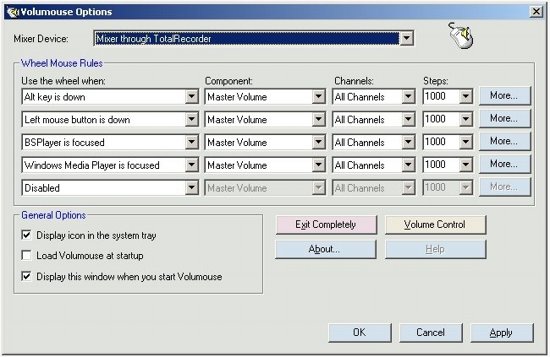
Volumouse is a free volume control software that you can use on your computer to turn the sound up or down using the wheel of your mouse. You can change the settings so that you can control when you want to use this application to control your sound, and is very easy to use. The programmable settings make this free volume controller an asset for anyone who enjoys multitasking while they are working on their computer.
To use this free sound settings controller you can download it directly from the website. It is compatible with Windows 98, ME, NT, 2000, 2003, and Windows Vista. After you have downloaded the program you can change the rules for when you want to use the wheel to turn up or down the volume. The program walks you through the steps and makes it easy to navigate the settings.

Features of Volumouse:

  • Control Settings: You can determine which programs on your computer you want to be able to turn up and down with the mouse wheel. There may be music playing in the background when you receive a go to meeting call. You will be able to turn the music down quickly with the mouse and get to the web meeting. Same will work with other applications on your computer. You may need to watch a video and discuss it with people in a chat room at the same time. You will be able to quickly turn down the sound after a point is made, and chat with the group about it.
  • Translate to another Language: You can use Volumouse simply in a different language, and it is very simple to change this. This program is available in over 20 different languages. You can have it translated in Dutch and even Finnish! This is very helpful if you have a version downloaded in English and want to distribute it to your Spanish speaking employees.
  • License: Since Volumouse is freeware you can redistribute it if you wish to. You cannot charge anything for it because it is not meant to make a profit. It is nice to share freeware with your friends and it is good that you have that option. You can save the program to a disk or send it in an email.
  • Window and Screen Settings: There is a feature with the program that will allow you to use the wheel to turn any window open on your screen transparent. This is helpful if you need to work on two windows simultaneously. You can also set the control for the wheel where it controls the brightness of the screen. This is just an added perk to the already convenient volume controls.
Download Volumouse free.
Source: I♥FreeSoftware
Continue Reading