Showing posts with label Windows. Show all posts

Freeware To Bulk Convert PDF To Text

XiXi PDF to Text is a freeware to bulk convert PDF to text files. It also lets you set destination location of your choice to store output text files. Whenever you need to extract text content from a PDF file (that includes charts, images, etc.), this software will be handy to use. This software provides a very fast and straightforward way to fetch text from multiple PDF files.

You only need to use few mouse-clicks, and text will be extracted from the input PDF files for you. Text extraction process is also very quick that makes this software more valuable. However, it doesn’t help to extract text from password protected PDF files.
In the above screenshot, you can see the text extracted from a sample PDF file using this utility.

How To Bulk Convert PDF To Text?

To use this freeware, download its zip file (less than 2 MB) using the link placed at the end of this review. Extract the zip file and run the installation process. Its installation is ad-free and very easy. Complete the installation process and open its interface.

Interface of this software is good looking and self-explanatory. To convert PDF files to text files, you can add PDF files in two different ways: use Add PDF Files.. button or drop PDF files on its interface.
Once the PDF files are added, you can select destination folder where extracted text will be stored. After this, just tap on Convert All button, and it will start converting PDF files into text files. Text files are created with original PDF file name.
As soon as the conversion process is completed, it will prompt you to open text files. This is a useful feature as you don’t have to move to the destination folder manually.

Get XiXi PDF to Text free. Here
Continue Reading

Best Free Image And Photo Editing Software: PAINT.NET

Paint.NET is free image and photo editing software. It has a simple, intuitive, and innovative user interface; yet provides most of the advanced functions available in expensive image editing software. This makes it the best powerful yet simple image and photo editor tool.
I personally use this software a lot (to create most of the images for this website), and just love it. Apart from the fact that it is a completely free image editing tool, here are some of the features that I like most about it:

Unlimited Undo:
I am not an advanced user, so keep on making lots of mistakes in my edits. Paint.net provides unlimited undo, and  redo. So, no matter what mess I create, I can always revert it back to any step of my image editing.

Simple and Intuitive Interface:
The interface is really easy to use. It provides a tabbed document display, and provides a live thumbnail of all the images. All other functionalities are well placed, and can be easily found.

Layers:
It provides options to create rich layers, something available only in expensive image editors.

Special Effects:
It provides lot of options for special effects, including, blurring, sharpening, red-eye removal, distortion, noise, and embossing are included. Also provides unique 3D Rotate/Zoom effect that makes it very easy to add perspective and tilting. It also lets you tweak an image’s brightness, contrast, hue, saturation, curves, and levels.

Powerful Tools:
It provides some really powerful tools for creating shapes, Gradient Tool, Magic wand for selecting regions of similar color, and the Clone Stamp for copying or erasing portions of an image.

All these features make it the Best Free Image Editor.

Download Paint.Net Free: Download
Continue Reading

Download Driver HP Pavilion g7-2278sa Notebook PC Windows 8.1 64-bit

Chipset
Intel Chipset Installation Utility and Driver
Released : 2012-11-22
Version : 9.3.0.1025
File size : 4.27 Mb
File name : sp59647.exe
Download

Audio/Sound
IDT High-Definition (HD) Audio Driver
Released : 2012-11-22
Version : 6.10.6425.0
File size : 43.27 Mb
File name : sp59649.exe
Download

Display / VGA
AMD High-Definition (HD) Graphics Driver
Released : 2012-11-26
Version : 8.982.10.1600
File size : 300.06 Mb
File name : sp59936.exe
Download

Intel High-Definition (HD) Graphics Driver
Released : 2013-10-11
Version : 10.18.10.3277
File size : 157.73 Mb
File name : sp63753.exe
Download

Touchpad
Synaptics TouchPad Driver
Released : 2013-05-10
Version : 16.5.3.3
File size : 136.29 Mb
File name : sp61882.exe
Download

MEI
Intel Management Engine Interface (MEI) Driver
Released : 2012-10-18
Version : 8.1.0.1263
File size : 31.71 Mb
File name : sp58516.exe
Download

HDD / Storage
Intel Rapid Storage Technology Driver
Released : 2012-12-31
Version : 11.6.2.1002
File size : 8.76 Mb
File name : sp60284.exe
Download

Card Reader
Realtek Card Reader Driver
Released : 2012-10-18
Version : 6.2.8400.29029
File size : 17.28 Mb
File name : sp58518.exe
Download

LAN / Ethernet
Realtek Local Area Network (LAN) Driver
Released : 2012-10-18
Version : 8.3.730.2012
File size : 5.84 Mb
File name : sp58519.exe
Download

Wi-Fi / Wireless Lan
Qualcomm Atheros QCA9000 Series Wireless LAN Driver for Microsoft Windows
Released : 2014-01-10
Version : 1.00
File size : 42.38 Mb
File name : sp65048.exe
Download

Mediatek 802.11 Wireless LAN Adapter Driver
Released : 2013-12-13
Version : 5.0.37.0
File size : 39.74 Mb
File name : sp64825.exe
Download

Mediatek 802.11 Wireless LAN Adapter Driver
Released : 2013-09-19
Version : 1.00
File size : 38.49 Mb
File name : sp63302.exe
Download
Continue Reading

Download Compaq Presario CQ40-512TU XP Driver

First Install  Netframework: (require for Quick Launch Installation).
Net framework 2.0
Download

DRIVERS (18)

Chipset
Intel Chipset Installation Utility
Version 9.1.1.1015 A 2.2MB (xp, vista, 7)
Download

Storage
Intel Matrix Storage Manager Driver 
Version:8.9.2.1002 A, 18.17M
Download 

Graphic/VGA
Mobile Intel 4 Series Express Chipset Family Graphics Driver
Version 1.00 REV A 19.28MB
Download

Nvidia GeForce G 105M/G 103M For windows XP
Version 2.66.58WHQL  118MB
Download


Audio Drivers:
Since there are no best single driver available, you have to follow this step carefully.

1. Install MS-UAA first:
Windows XP, XP SP2: Download  (KB888111)
Windows XP SP3: Download  (KB835221)

Restart and then install audio drivers below.

2. Install the Audio:
IDT High Definition Audio Codec
(2 drivers, if the first one didn't work, use 2nd drivers)
Download (SP41693)
Download (SP39671)

 If resulting in error, ignore it and proceed  by manually install the drivers:

Download and install the driver, you will get the error while  installing.
Perform the below steps to fix the issue.
1. Click on Start and select Run. Now type devmgmt.msc and press enter.
2. Right click on "Audio device on High Definition Audio Bus" and click  Update driver.
3. Select "Install from a list or specific location".
4. Click Next. Then select "Don't search, I will choose the driver to  install".
5. Click Next and then select "Sound, video and game controller" from  the list.
6. Click Next and then click Have Disk.
7. Click Browse C:\swsetup\sp39671 folder and select the .inf   file and click open and Continue with the onscreen instructions.

Wireless:
(3 drivers, choose 1 base on your specification) 

Broadcom 4313 a/b/g/n wireless Drivers
Version5.10.91.8 10MB
Download

Intel PRO/Wireless Drivers:
(requires windows installer 3.0 installed first)
Version 5.20 4MB
Download

Atheros Wireless LAN Driver:
Version 2.00B 20.64MB
Download


Bluetooth:
HP Integrated Module with  Bluetooth Wireless Technology
Version 5.1E  94.68M
Download

Modem
High-Definition Audio (HDA)  Modem Installer and Driver
Version 1.00 A 12.71MB
Download

Lan/Ethernet
Realtek RTL8102E Family  PCI-E Fast Ethernet NIC
Verison 1.00A 4.8MB
Download
updates available here 

Card Reader
JMB38X Card Reader Host Controller
Version 1.00A 3.49MB
Download

Touchpad:
Synaptics Touchpad Driver 
Version:9.1.11 Q, 16.93M
Download

Button:
(Install netframework 2.0 first)

HP Quick-launch Button
Version 6.40B 19MB
Download

Camera
Cyberlink youcam software 2.0 + Driver
Version 2.0.2519 46MB
Download

Others
Lightscribe  system software
Version 1.18.1.1 A 8.4MB
Download

Continue Reading

Free Download Driver Asus X53Sc Windows 7 32-bit


Chipset
Intel INF Chipset Update Driver
Released : 2011.05.16
Version : V9.2.0.1015
File size : 5,05 Mb
File name : Chipset_Intel_Win7_32_Z9201015.zip
Download

Sound / Audio
Realtek Audio Driver
Released : 2011.08.02
Version : V6.0.1.6373
File size : 88,19 Mb
File name : Audio_Realtek_Win7_32_Z6016373.zip
Download

Display / VGA
Intel Graphics Driver
Released : 2011.07.28
Version : V8.15.10.2291
File size : 67,21 Mb
File name : VGA_Intel_Win7_32_Z815102291.zip
Download

nVidia Graphics Driver
Released : 2011.06.29
Version : V8.17.12.6856
File size : 119,23 Mb
File name : VGA_nVidia_Win7_32_Z817126856.zip
Download

Intel Wireless Display Application
Released : 2011.06.29
Version : V2.1.35.0
File size : 136,52 Mb
File name : Wireless_Display_Intel_Win7_32_Z21350.zip
Download

Turbo Boost
The Turbo Boost Monitor application
Released : 2010.08.19
Version : V1.0.400.4
File size : 17,96 Mb
File name : TurboBoost_Monitor_Win7_32_Win7_64_z104004.zip
Download

ATK
ATKACPI driver and hotkey-related utilities
Released : 2011.04.29
Version : V1.0.0008
File size : 8,02 Mb
File name : ATKPackage_Win7_32_Z100008.zip
Download

Touchpad
Elantech Touchpad driver
Released : 2011.04.01
Version : V8.0.5.0
File size : 9,44 Mb
File name : Touchpad_Elantech_Win7_32_Z8050.zip
Download

Keyboard Device Filter Utility
Released : 2011.07.01
Version : V1.0.0.3
File size : 148,83 Kb
File name : KB_Filter_Win7_32_Z1003.zip
Download

USB
USB3.0 Driver
Released : 2011.06.29
Version : V1.10.0.0
File size : 3,5 Mb
File name : USB3_Win7_32_Z11000.zip
Download

MEI
Intel Management Engine Interface
Released : 2011.07.01
Version : V7.0.0.1118
File size : 200,8 Kb
File name : MEI_Win7_32_Z7001118.zip
Download

HDD / Storage
Intel Rapid Storage Technology driver
Released : 2011.07.01
Version : V10.0.0.1046
File size : 338,32 Kb
File name : IRST_Win7_32_Z10001046.zip
Download

Camera / Webcam
Azurewave Camera Driver
Released : 2011.01.30
Version : V5.8.55133.208
File size : 3,74 Mb
File name : Camera_Azurewave_VS010_Win7_32_Z5854000208.zip
Download

ASUS Virtual Camera Utility (The Camera driver must be installed.)
Released : 2011.04.29
Version : V1.0.21
File size : 1,99 Mb
File name : VirtualCamera_Win7_32_Z1021.zip
Download

Card Reader
Realtek Multi-Card Reader Driver
Released : 2010.12.22
Version : V6.1.7600.10001
File size : 7,02 Mb
File name : CardReader_G73SW_Win7_32_Win7_64_Z61760010001.zip
Download

Bluetooth
Azurewave BlueTooth driver
Released : 2011.06.10
Version : V7.2.0.65
File size : 102,3 Mb
File name : Bluetooth_AW_Win7_32_Z72065.zip
Download

Lan / Ethernet
Realtek Local Area Network (LAN) Driver
Released : 2011.04.01
Version : V7.38.113.2011
File size : 5,61 Mb
File name : Lan_realtec_Win7_32_64_Z703801132011.zip
Download

Wi-Fi / Wireless Lan
Atheros Wireless Lan Driver and Application
Released : 2011.12.28
Version : V9.2.0.458
File size : 16,25 Mb
File name : WLAN_Atheros_Win7_32_Z920458.zip
Download

WiMAX Wireless LAN Driver
Released : 2011.06.30
Version : V6.1.1020.26
File size : 10,32 Mb
File name : WiMax_Family_Intel_Win7_32_Z61102026.zip
Download

Intel(R) 1000 WiFi with Cliffside Wireless LAN Driver
Released : 2011.06.29
Version : V14.1.1.3
File size : 47,31 Mb
File name : WLAN_Intel_1000_Win7_32_Z14113.zip
Download

Intel(R) 6250 WiFi Wireless LAN Driver
Released : 2011.06.29
Version : V14.1.1.3
File size : 47,31 Mb
File name : WLAN_Intel_6250_Win7_32_Z14113.zip
Download

Azurewave NB037 Wireless Lan Driver and Application
Released : 2011.03.15
Version : V9.0.0.222
File size : 63,81 Mb
File name : WLAN_Azurewave_AW-NB037_Win7_32_Z900222.zip
Download
Continue Reading

Download Driver Compaq Presario CQ40-416AU Windows 7

AMD AHCI Compatible RAID controller
 Download


AUDIO
IDT - High Definition Audio Codecs
Download SP45073

GRAPHIC:
ATI Mobility Radeon HD 3200/3450/4200/4330 Graphics
Download

HP Quicklaunch Button
Download (direct)
Download (HP)

ALPS Touchpad Driver
Download

HP Wireless Assistant
Download (direct)
Download (HP)

Realtek  PCI-E Gigabit Ethernet NIC Driver
Download

WIRELESS:
Broadcom Wireless LAN Driver for Microsoft Windows 7
Download

JMB38X MS SD SD/MMC xD Card Reader Driver
Download
 
Validity Sensor Driver For Windows 7
Download

Cyberlink YouCam Software
Download

Lightscribe System Software
Download

ENE CIR Receiver Driver
Download

Digital Persona Fingerprint Reader Software
Download

Recovery Manager Installer Patch for Microsoft Windows 7 Upgrade
Download
Continue Reading

Download Driver Compaq Presario CQ40-613TX Windows XP


First Install  Netframework: (require for Quick Launch Installation).
Net framework 2.0


DRIVERS (18)

Chipset
Intel Chipset Installation Utility
Version 9.1.1.1015 A 2.2MB (xp, vista, 7)

Storage
Intel Matrix Storage Manager Driver 
Version:8.9.2.1002 A, 18.17M

Graphic/VGA
Mobile Intel 4 Series Express Chipset Family Graphics Driver
Version 1.00 REV A 19.28MB

Nvidia GeForce G 105M/G 103M For windows XP
Version 2.66.58WHQL  118MB


Audio Drivers:
Since there are no best single driver available, you have to follow this step carefully.

1. Install MS-UAA first:
Windows XP, XP SP2: Download  (KB888111)
Windows XP SP3: Download  (KB835221)

Restart and then install audio drivers below.

2. Install the Audio:
IDT High Definition Audio Codec
(2 drivers, if the first one didn't work, use 2nd drivers)
Download (SP41693)
Download (SP39671)

 If resulting in error, ignore it and proceed  by manually install the drivers:

Download and install the driver, you will get the error while  installing.
Perform the below steps to fix the issue.
1. Click on Start and select Run. Now type devmgmt.msc and press enter.
2. Right click on "Audio device on High Definition Audio Bus" and click  Update driver.
3. Select "Install from a list or specific location".
4. Click Next. Then select "Don't search, I will choose the driver to  install".
5. Click Next and then select "Sound, video and game controller" from  the list.
6. Click Next and then click Have Disk.
7. Click Browse C:\swsetup\sp39671 folder and select the .inf   file and click open and Continue with the onscreen instructions.

Wireless:
(3 drivers, choose 1 base on your specification) 

Broadcom 4313 a/b/g/n wireless Drivers
Version5.10.91.8 10MB

Intel PRO/Wireless Drivers:
Version 5.20 4MB

Atheros Wireless LAN Driver:
Version 2.00B 20.64MB


Bluetooth:
HP Integrated Module with  Bluetooth Wireless Technology
Version 5.1E  94.68M

Modem
High-Definition Audio (HDA)  Modem Installer and Driver
Version 1.00 A 12.71MB

Lan/Ethernet
Realtek RTL8102E Family  PCI-E Fast Ethernet NIC
Verison 1.00A 4.8MB

Card Reader
JMB38X Card Reader Host Controller
Version 1.00A 3.49MB

Touchpad:
Synaptics Touchpad Driver 
Version:9.1.11 Q, 16.93M

Button:
(Install netframework 2.0 first)
HP Quick-launch Button
Version 6.40B 19MB

Camera
Cyberlink youcam software 2.0 + Driver
Version 2.0.2519 46MB

Others
Lightscribe  system software
Version 1.18.1.1 A 8.4MB


Continue Reading

Make XP Look Like Vista

How to make XP look like Vista? There's an easy way to make that happen. You just need to hold on tight to every word that follows below.
So, may be your computer system doesn't have enough RAM to support Windows Vista. May be you're too stony-broke to upgrade your system from Windows XP to Windows Vista. Or may be, you're too lazy to go to a computer technician to upgrade your OS. Whatever be the reason, reading this writeup and following the set of instructions put forth here makes your job easy. The beautiful graphical user interface of Windows Vista is loved by every Windows devotee, but it does call for some massive system requirements in your computer. Moreover, many users hesitate in upgrading their OS for they dread device crash, as per the negatives that Vista holds (for e.g., cases where users' Vista keeps freezing). Nevertheless, it is extremely easy to learn how to make XP look like Vista, provided you have some spare RAM on your computer system. So here's dishing out the method of making windows XP an exact copy of Windows Vista, without any upgrade.


How to Make Windows XP Look like Windows Vista

It might be a tad tricky for beginners to change the appearance of Windows XP, since the process involves a few technical steps. However, the following instructions easily help you attain that Vista-look you always wanted for your computer system. Pay heed to the following steps:

Change the Theme
The first and the most important step while making XP look like Vista is to change the appearance. Now, there is the most popular and, perhaps, the most effective theme you can download from the Internet, and apply to your present OS. It is called VistaXP, and is the closest to Windows Vista in terms of appearance. Note that it is a third party theme, and Microsoft is particular about theme transformations. Hence, the only solution to this is to patch up the uxtheme.dll file which restricts a user to download and apply third party themes. Determine your Service Pack, and download the relevant patch from the Internet.

Replace the Earlier Theme
After you have downloaded the patch, you will have to go to C:\\WINDOWS\System32, select uxtheme.dll and drag it into the replacer box. Here, you need to pick and drop the patch you downloaded, and confirm. Lastly, when you have downloaded the theme you require to apply, unzip it in the Theme folder of your computer, which goes by this path - C:\\WINDOWS\Resources\Themes.

Download Vista Cursor Pack
Cursors are a significant part of the operating system interface, and Windows Vista's cursors are much more attractive than those of XP's. In order to enhance the appearance of your theme, you will have to download Vista Cursor pack, and unzip it on your desktop. The extraction of Vista cursors will automatically install all cursors into your operating system. Go to Control Panel, select Appearance and Themes, and click on Mouse Pointers. With this, you can change the cursor, and bask in the enriching feel of Windows Vista.

Download the Transformation Pack
This is the last step of making Windows XP look like Windows Vista, wherein, you will have to download the transformation pack from the Internet, that will change the appearance of the Start Menu, dialog boxes, and all other menus into Vista ones. The Internet contains a lot of transformation packs with the help of which you can easily figure out the ones that you need. Just type in Vista Transformation Pack for Windows XP, and you will have what you require.

After downloading all packs, and implementing them, restart your computer. You will see an entirely new screen, which is not only more beautiful and attractive, but also better in terms of user-friendliness. The packs you downloaded would enable gadgets, better taskbar and sidebar, and an entirely new interface to work upon. Now, when you have read about how to make XP look like Vista, try it on your computer too. Here's just a last bit of advice - download a replacer that backs up the present theme you have, so that if in case anything goes wrong, you don't lose anything at all. Try it out, and come back here to discuss the results.
Source: BestCuteFun
Continue Reading

Free Alternative to Windows Built-in Search: Super Finder XT


Super Finder XT is a free desktop search software for Windows  Operating system, using which the user can  search for files, documents, folders and other such data , effortlessly. Of course the Windows comes with a built- in search facility. But often this is very slow in terms of returning the search results and sometimes  it becomes very inconvenient to use. Super Finder XT just solves this problem. You can think of this software as a free alternative to Windows built-in search.
Super Finder XT is efficient in a number of aspects when compared to the usual Windows Search feature. The Windows built- in search feature does not search codes for a HTML file, but this desktop search freeware does this. Also the user can right click on the search result items and open them using the applications  of choice. This makes this free Windows built-in search alternative unique and extremely useful .

Some of the Remarkable Features of Super Finder XT Includes:

  • Special search functions that make the job very much easier and better. There is a significant difference in the search speed as well, when compared to the conventional search facility.
  • The user can search for text (plain or unicode) in  a file. Even searching for hexadecimal patterns in a file is possible.
  • Works very well with the latest versions of OS such as Windows Vista and 7.
  • An intuitive interface with multiple view modes XT and Classic, for the user choose according to convenience.
  • Two different operational modes as well, Simple and advanced for varying needs.
  • Options to customize the search is also available. The user can specifically choose the folders and drives to look for while searching. This is one useful option which would make the search more faster and efficient.
  • Selectable color schemes and user interface options.
  • Shell integration and support for using Hot Keys is also available.
  • Drag and Dropping the search list files, One click operations such as open, View, Delete, explore, rename etc., is also available.
  • Options to remember the user preferences and highly customizable features make this software, extremely convenient to use.
  • Multiple language support is also available.
With all these features, Search Finder XT is a great replacement for the Windows Search facility.
Super Finder XT can be downloaded from their official website and the size of the installer is just about 5 MB. The installation process is quick and simple as well. A simple and an intuitive interface, makes it very convenient for the user to work with this free search software.
Download Super Finder XT Free.
Source: I♥FreeSoftware
Continue Reading

Download Windows 8 Leaked Build 7850 (Download)

Microsoft has a original plan to release Windows 8 in 2012. However, the early Windows 8 build has been leaked out to the market. This is a very early build of Windows 8, even earlier than Windows 7 SP1. However, some of the basic & enhanced features has been added in this build, like Windows Live ID showed up in the taskbar. If you can’t wait to experience the new Windows 8, let’s try the leaked version now. Download it after the break.
shhh… let’s not leak our hard work.. Hahaha..Let’s download the leaked version!

Download

Download torrent here.
[Info via mydigitallife]
Source: Vodeblog
Continue Reading

Download Sailing and Surfing Theme for Windows 7

Microsoft is frequently updating the Windows 7 Personalization Gallery with official Windows 7 themes. This week Microsoft has added two new theme packs, Surfing and Sailing. Both the themes contain high resolution wallpapers of popular beach sporting activities and an awesome new “beach” sound scheme.

source: buzz99
Continue Reading

How To Install Windows 7 Using USB Drive

Microsoft had recently released a utility that allowed you to make a USB memory stick to install Windows 7 on computer’s that did not have a DVD drive. However Rafael Rivera of the “Within Windows” blog pointed out that the tool contained some GPL v2 licenced code and Microsoft have now quickly removed it from their web site. UPDATE: Microsoft has admitted that they violated the GPL v2 licence and have now released the tool under open source. In any case the instructions below show you how to build a much better bootable USB install memory stick that allows you to install ANY version of Windows 7.

 
If you have bought multiple version of Windows 7 and compared the DVD’s you might have noticed that they are the same with the exception of one file (ei.cfg). This one file tells Windows what version to automatically install during the install process. Because all the DVD’s are essentially the same you can use any Windows 7 DVD to perform a version upgrade of Windows 7 using the “Upgrade Anytime” option.

Now to make this bootable universal Windows 7 install USB memory stick you will need at least one Windows 7 DVD 32bit or 64bit depending on what version you want to install and a blank 4gb USB memory stick. Note you will need to create a separate 32 or 64bit USB memory stick of Windows 7 but it will let you install the different SKU’s.

Step 1. Insert the Windows 7 DVD into your computer and the USB memory stick into your computer

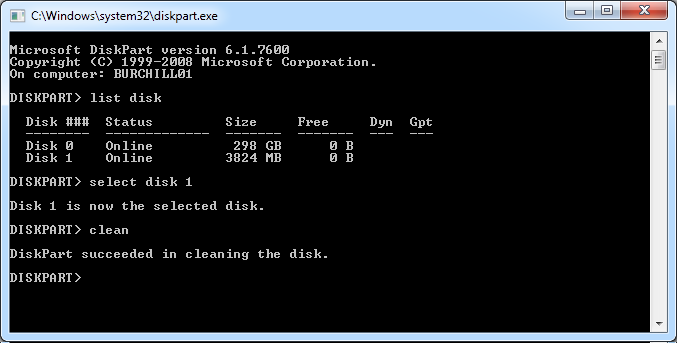
Step 2. Open an “Command Prompt” and run “DISKPART”.

This will launch the diskpart utility in a separate windows and perform a UAC prompt.

Step 3. Type “LIST DISK” and take note what the disk number is of the USB memory stick. This will be the same size as the USB memory stick (eg. 3824 MB = 4 GB).
Step 4. Then type “SELECT DISK X” where X is the disk number of the USB memory stick.
Step 5. Type “CLEAN”. Warning – This will wipe all data from the USB memory stick.
Step 6. Type “CREATE PARTITION PRIMARY”
Step 7. Type “SELECT PARTITION 1”
Step 8. Type “ACTIVE”
Step 9. Type “FORMAT FS=FAT32” (and wait about 5 minutes depending on the size and speed of the USB memory stick)
Step 10. Type “ASSIGN”.
You will notice the auto play window now appears. Take note of the drive letter (e.g. F:\ ) and close this window.
Step 11. Type “EXIT”

Step 12. Back at the command prompt type “xcopy d:*.* /s/e/f F:” where D: is the drive letter of you DVD and F: is the drive letter of your USB Memory stick.

Don’t worry if it takes a long time to copy boot.wim and install.wim as these are the two largest files on the DVD.
Step 13. Once the xcopy is finished  run “del F:\sources\ei.cfg” from the command prompt and you Windows 7 Bootable USB memory stick is ready to go. Doing this step is what makes the USB memory stick allow you to install any version of Windows 7 as it no longer has a default version configured.
You can now either boot from the USB memory stick or just run setup.exe from the drive to start the install process. Either way you will now prompted for the version of Windows 7 you want to install.
Warning: This procedure will allow you to install a copy of Windows 7 that you are not licenced to have. Therefore you need to be very careful to only select a version that you have a licence key for as you will not be able activate Windows without a key that exactly matches the version you have installed.

Source : Windows7Center
Continue Reading

Windows 8 Build Final , First Beta Scheduled for this Summer


According to the sources  Microsoft’s Windows 8 second Milestone build has been finalized, with Milestone 3 the next to be worked on. After that stage it’s only a matter of time before we see a beta of Windows 8 in testing.
Microsoft compiled 6.2.7947.0.winmain_win8m2_escrow.110218-1608 on Friday after pushing out a number of Windows 8 builds recently. Things are moving along nicely behind closed doors, and versions of the OS will soon be allowed out to Microsoft’s trusted partners for testing. Some of the recent Windows 8 builds which were compiled in the last couple of weeks were:

6.2.7925.0.winmain_win8m2.110207-1736
6.2.7926.0.winmain_win8m2.110209-1755
6.2.7927.0.winmain_win8m2.110210-1740
6.2.7928.0.winmain_win8m2.110214-1825
6.2.7929.0.winmain_win8m2.110215-1802
6.2.7930.0.winmain_win8m2.110217-1825
With Microsoft working on an ARM-compatible version of Windows, it is possible that this could be the version first to testing, with the full desktop experience coming later. With recent leaks pointing toward a version of Windows 8 being ready for future tablets in early 2012, it’s clear that there is no time to waste for the Redmond outfit, especially if they hope to take on Apple and Google in the rapidly expanding tablet market.
Little is really known about Windows 8, though a more cloud-centric OS is expected especially considering the focus on tablets and other machines with no conventional disk drive. Microsoft is keeping its cards close to its chest thus far, though it’s clear the company sees Windows 8 as a pivotal software release, heaping more pressure on an already creaking development team. Still stung from the Vista debacle, MS will be hoping Windows 8 can build on the good faith the 7th installment of the OS managed to return.
Lets see, whats there for us this time.
Continue Reading